
Mturk Jobs

Mturk Jobs
Mturk Jobs

Tank

Showing posts with label PC fan wind turbine. Show all posts

Monday, December 4, 2017

PC Fan Wind Sensor with Arduino

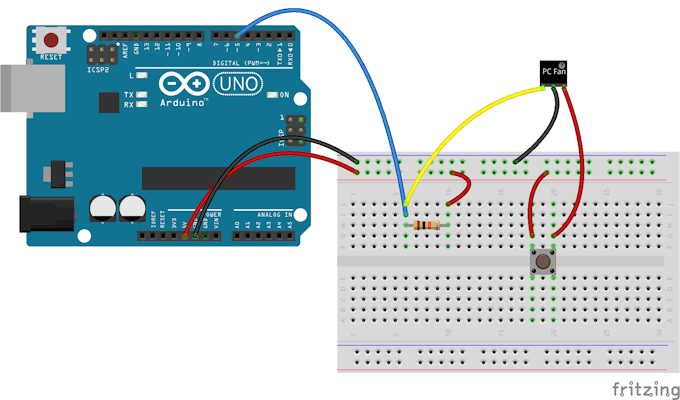
You can use an Old PC Fan as a wind sensor as in this project. Yes, you can make an easy anemometer using Arduino and a PC Fan.


In this project, a 3 wire PC fan is used. The third wire comes from a Hall Effect sensor that measures the fan speed.
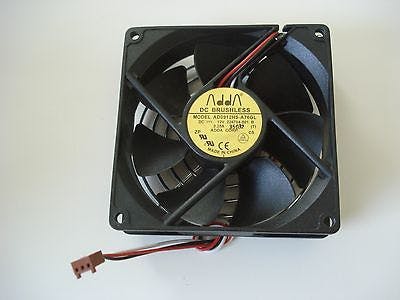

As the fan rotates, the Hall Effect sensor produces pulses.

The results are sent to the serial monitor.

Here is the code that does the job:

#include 
#include "FanMonitor.h"

// ***
// *** Pins
// ***
#define FAN_MONITOR_PIN 5

// ***
// *** Define the FanMonitor instance to monitor
// *** the 3-wire fan.
// ***
FanMonitor _fanMonitor = FanMonitor(FAN_MONITOR_PIN, FAN_TYPE_BIPOLE);

void setup()
{
  // ***
  // *** Initialize the serial port.
  // ***
  Serial.begin(115200);

  // ***
  // *** Initialize the fan monitor.
  // ***
  _fanMonitor.begin();
}

void loop()
{
  // ***
  // *** Get the fan speed.
  // ***
  uint16_t rpm = _fanMonitor.getSpeed();

  // ***
  // *** Print the speed to the serial port.
  // ***
  Serial.print("Speed = "); Serial.print(rpm); Serial.println(" RPM");
  
  // ***
  // *** Delay 1 second.
  // ***
  delay(1000);
}


I thought of something a little bit different.

I've managed to make a PC Fan wind Turbine by removing the PC Hall Effect sensor and electronic commutator IC and connecting the terminals to the Fan winding.

You can find more details about it here.


By making this connection, I've turned the PC Fan into a small wind turbine that produced about 3-6 Volts in fair wind speed.


The output voltage can light an LED. And it can also be used as an indication for wind speed.


By connecting the output of the modified PC Fan to Arduino Analog Input, we can get an indication for wind speed.


Using Arduino in this project makes monitoring and calibration process very simple and straight forward.

More photos, code and results will be available soon.

Thank you for reading.

Check my books on Amazon



Embedded Systems, Electronics: My Projects Collection From Instructables by [Ebeed, Ahmed]


PC Fan Wind Turbine: How to turn an old PC Fan into a small wind turbine the easy way by [Ebeed, Ahmed]


Friday, November 24, 2017

Wind Turbines Made Easy. From passion to reality

This post is not exactly about embedded systems.

Although it’s more about making. Making as a hobby and a global trend. 

My passion for making started with me so early. But I didn’t find a way to monetize this passion until only recently. 

Making for me means the ability to think about something and trying to bring it from idea to a real thing in the real world. 

It may be an electronic circuit, software program, a piece of art or even a wind turbine.

In this case I’ll show how I managed to make my ideas real. And that’s the best part of it. 

You may feel like daydreaming about making something and it just cannot get out of you mind. You don’t feel satisfied until you actually make that thing. 

This is exactly what happened with me when I’ve been dreaming of building a wind turbine. 

I didn’t think of making something big or living off the grid. I couldn’t imagine myself building a 5kw wind turbine that can run some of my household appliance. 

Only I wanted to make a small wind turbine that could light an LED or recharge my cellphone. 

Just when I saw it on instructables.com and found all those people successfully building their own systems what gave me enough encouragement and motivation to do it. 

It only turned into reality when I first built my first one. It works. It could light that small LED. 


I found myself obsessed with that source of power and couldn’t help except reading about it. And I just had a new passion. 

You know when you succeed in something and you want to get more out of it. That’s what happened when my first wind turbine worked with me. I then wanted to make more and more. 

I found some documentation online. I got myself some material from Amazon and used a lot of scrap parts. 

I recycled many things to make my wind turbines to come. The experience was so encouraging. As I made more small wind turbines I learned something new form each one.


I thought that it is what kids and students would need to begin thinking of designing their own systems. 

If you are like me, you may not want to live off the grid or make your own Megawatt wind turbine but sure you want to use this breeze of air to make some power out of it. 

It all worked well for me and I made my own wind power phone charger. 

Today, I’m sharing with you what I made and put it all in one book.

Backyard Wind Turbines: Harness Wind Power with Simple and Fun Projects


It’s available on Amazon and it has made a huge success from the first day of its launch. 

I hope you like it.

Thank you for reading.

Friday, July 12, 2013

PC Fan Wind Turbine - How to turn a PC Fan into a small Wind Turbine

This post is not about Embedded Systems. But it is about a DIY project of mine. Old cheap PC Fan to a small Wind Turbine.

I looked at the some old PC Fans I have and thought that they can be used as Small Wind Turbines.


PC Fan from Banggood


The PC Fan is Brush less DC ( BLDC ) Motor. It can be converted to a generator in 5 Minutes.

The concept is simple. You can skip this part and start directly with the conversion.

The BLDC motor used here has a stator winding and a Permanent Magnet Rotor. The motor is supplied by 12V DC. But the magnetic field rotation is generated by electronics ( Electronic Commutator ) . As the name implies , the electronics components convert DC into AC which makes the magnetic filed in the stator rotate.


The electronic commutation is achieved by a small IC.


To get the induced current from the motor used a generator , you must remove this IC .


This is what I 'll show you how.


All what you'll need is this tool

crocodile clip


First remove sticker on the back of the fan.


Then you 'll find a small piece of plastic lock that holds Fan shaft secured , Don't brake it. Remove it with a crocodile clip .


PC Fan from Banggood


You may like some vidoes from my YouTube Channel AeroArduino


You can see 4 poles of winding connected in series and have only 2 terminals. To get the induced current ,  connect supply wires to those terminals and let the fan rotate.
With  a solder iron , gently remove solder under IC pins and then remove the IC.


Remove this IC.


PC Fan from Banggood


You can see that the winding is connected to the board at three points. One common and tow other terminals.


 Remove the supply wires form there place to put them in the points where the tow winding wires are connected to the board.


Now , you have the stator ready to generate current. Now install the fan.


PC Fan from Banggood


Assemble the fan in its place and lock it with the piece of plastic I told you about.

Put back the sticker.


Connect LED terminals to the Supply wires. Don't worry about +ve and -ve terminals , the LED will light if you connect it any way , trust me.


Roll the Fan

This video can give you a step by step quick guide


This video shows the fan in action.


PC Fan from Banggood


Here is the project on instructables.com

http://www.instructables.com/id/Old-PC-Fan-Wind-Turbine-in-10-Minutes/


You can read this article in Arabic

يمكنك قراءة هذه المقالة باللغة العربية 


http://idea-arabic.blogspot.com/2014/11/blog-post_26.html Done


You may like one of my new books on Amazon

Check Them Out. You can buy or either read for free with Kindle Unlimited Service


Embedded Systems, Electronics: My Projects Collection From Instructables by [Ebeed, Ahmed]


PC Fan Wind Turbine: How to turn an old PC Fan into a small wind turbine the easy way by [Ebeed, Ahmed]


If you like this blog you can support us by many ways:
   
   1. Leave comments stating your point of view about this article.

   2. Buy our book on Amazon Learn By Making.


Thank you for visiting our blog.

Tank