Today I found a Mind controlled quadcopter that is fully controlled by the power of thoughts with the NeuroSky headset and Arduino MKR1000 Board.
The project is very cool and thrilling.
It's definitely for quadcopter or Arduino haters. It actually needs a lot of work, patience and understanding.
Above all, it needs that you have the NeuroSky MindWave Headset(~$75) and MKR1000 Board(~$60) from Microsoft.
I've been searching all night about a way to make a simple and easy way to read mind signals (EKG Sensor) but without any result.
All circuits and sensors are complicated and very expensive.
Then I just stumpled upon the GSR (Galvanic Skin Response) which is typically the skin resistance variation in different times due to stress or fear.
I found that this sensor is faily simple and easy to make.
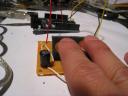
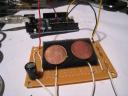
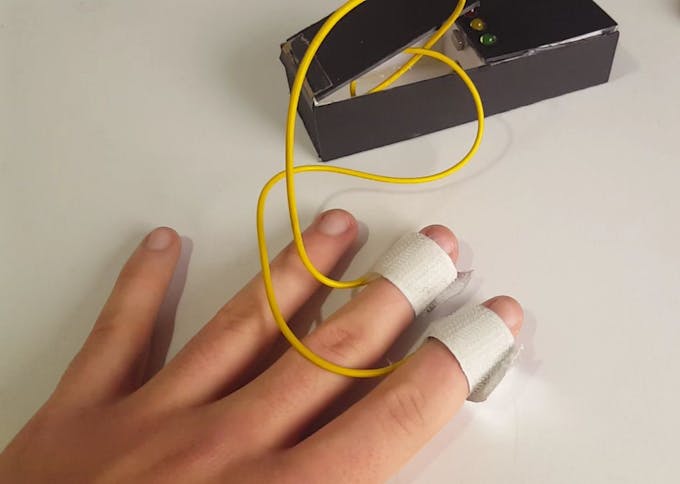
It is actually made of two simple electrodes to measure the skin resistance without the need for any amplifiers or filters as in any other biometric signal measurement.
With one lead sends current while the other measures the difference.
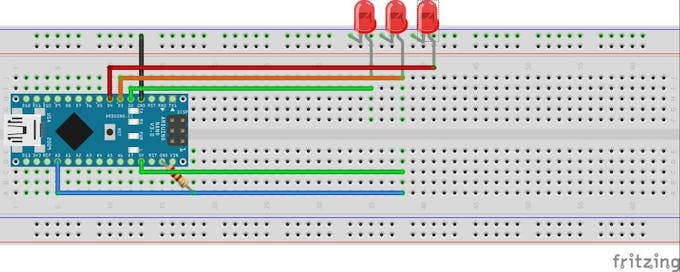
Arduino is used to measure the resistance at a 50 milliseconds intervals.
The results are sent to processing code to be displayed.
That's what I call an easy project.
So I've decided to include it here on my blog.
Code
Arduino Code:
void setup(){
  Serial.begin(9600);
}

void loop(){
  int a=analogRead(0);
  if (Serial.available() > 0) {

    byte inbyte=Serial.read();
    if(inbyte=='a'){
      Serial.print(a,BYTE);


    }
  }
}
Processing Code:
import processing.serial.*;
Serial myPort;

int hPosition = 1;     // the horizontal position on the graph
float currentReading;
float lastReading;
int count=0;
int zeroLinePos=0;

float gsrAverage,prevGsrAverage;
float baseLine=0;
long lastFlatLine=0;
color graphColor=color(255,255,255);
int baselineTimer=10000;
int gsrValue;
int gsrZeroCount=0;
float gsrRange=0;
int downhillCount=0;
int uphillCount=0;
boolean downhill;
boolean peaked=false;
float peak, valley;

void setup () {
  size(900, 450);
  // List all the available serial ports
  //println(Serial.list());

  myPort = new Serial(this, Serial.list()[0], 9600);
  currentReading=0;
  lastReading=0;
  gsrAverage=0;
  background(0);

  smooth();
}

void draw () {
  //best delay setting for gsr readings
  delay(50);
  //image(myMovie, 0, 0);

  if (gsrValue<15 amp="" gsrvalue="">-15){
    if( gsrZeroCount>10){
      currentReading=0;//flatline
      gsrAverage=0;
      baseLine=0;
      lastFlatLine=millis();
      gsrZeroCount=0;
      // println("reset");

    }
    gsrZeroCount++;
  }
  else{
    currentReading=gsrValue-baseLine;
    gsrZeroCount=0;
  }

  if(millis()-lastFlatLine>baselineTimer){
    baseLine=gsrAverage;
  }

  //graph colors
  if(gsrAverage>0 && gsrAverageheight/2.0*.25 && gsrAverageheight/2.0*.5 && gsrAverageheight/2.0*.75) graphColor=color(255,100,0);

  gsrRange=peak-valley;

  // at the edge of the screen, go back to the beginning:
  if (hPosition >= width) {
    hPosition = 0;

    //cover last drawing
    fill(0,200);
    noStroke();
    rect(0,0,width,height);
  }
  else {
    hPosition+=1;
  }

  gsrAverage=smooth(currentReading,.97,gsrAverage);

  //draw stuff

  //spike
  noStroke();
  if(gsrRange>200){
    fill(255);
    ellipse(10,10,20,20);
  }
  else{
    fill(0);
    ellipse(10,10,20,20);
  }

  //graph
  strokeWeight(.5);
  stroke(graphColor);
  line(hPosition-1, height/2.0-lastReading, hPosition, height/2.0-currentReading);
  stroke(255,0,100);
  line(hPosition-1,height/2.0-prevGsrAverage,hPosition,height/2.0-gsrAverage);

  //draw peaks
  int thres=7;

  noFill();
  stroke(255,0,0);
  strokeWeight(2);

  if (currentReading-thres>lastReading&& peaked==true){
    downhill=false;
    //println(downhillCount);
    uphillCount++;
    downhillCount=0;
    point(hPosition-1, height/2.0-lastReading);
    valley=lastReading;
    peaked=false;

  }
  if(currentReading+thres 1){      // check to make sure param's are within range
    filterVal = .99;
  }
  else if (filterVal <= 0){
    filterVal = 0;
  }
  smoothedVal = (data * (1 - filterVal)) + (smoothedVal  *  filterVal);
  return (int)smoothedVal;
}





![A Trip To Siwa Oasis: Tourist guide to an Egyptian Oasis by [ElSakhawy, Sara M.]](https://images-na.ssl-images-amazon.com/images/I/51-IGAzLKML.jpg)
![The Ultimate travel bag list by [ Elskhawy, Sara M.]](https://images-na.ssl-images-amazon.com/images/I/51OlVgqIcwL.jpg)
![Why to Travel?: Travel Like an Insider by [M., Sara]](https://images-na.ssl-images-amazon.com/images/I/51BsVhmk3ZL.jpg)
![3 Easy steps to plan your trip: Travel Like an Insider by [Elskhawy, Sara M.]](https://images-na.ssl-images-amazon.com/images/I/51GRc%2BnSxAL.jpg)
![Solar Artwork: How to Make Your Own Solar Masterpiece by [Ebeed, Ahmed]](https://images-na.ssl-images-amazon.com/images/I/51wT6i0RXNL.jpg)
![Backyard Wind Turbines: Harness wind power with simple and fun projects by [Ebeed, Ahmed]](https://images-na.ssl-images-amazon.com/images/I/51JEcdMP8JL.jpg)